


Menu Settings
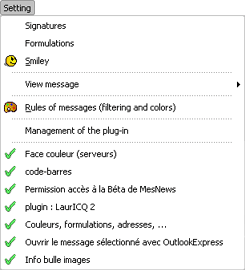
Index menu Settings :
- Signatures : configuration random signatures, to be used in the groups. You have to set random signatures in modify signatures, in properties of server and in properties of group, in the tab signatures of those screens.
- Formulations : this menu lets you change the random formulations to use when you answer a message.
- Smileys : this menu gives you access to the choice of Smileys that will be added in your messages.
- View messages : management of the view of message bodies (color, style, etc.) This menu shows other menu's:
- View of messages: shows screen management of view of messages-
- {default} : shows the messages in default view of MesNews.
- List of other views, inserted by you. The styles "Police fixe (fixed style)" en "Police proportionnelle (proportionel style)" are installed when you install MesNews : this lets you use a proportionel polis (view) to view your messages; these 2 styles can be changed or removed via screen view of messages
- Management of plugins : management of plugins, to choose the plugins you want to use.-
- Then the menu shows you the list of plugins. Some plugins have settings you can change, you will get a window where you can change them when you click on the plugin name.