


Preferences - Miscellaneous - confirmations
The screen of the menu Options\Miscellaneous/Miscellaneous lets you select the MesNews validation boxes.:
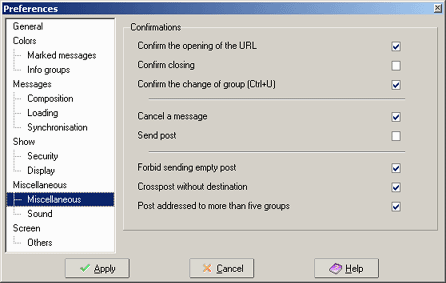
Zone Confirmations :
- Confirm the opening of the URL : when ticked and you are clicking on a url MesNews will show a confirmation screen before opening your browser.
- Confirm closing : when ticked you will get a confirmation screen when closing MesNews. Otherwise no confirmation box will be shown when you click File\exit .
- Confirm the change of a group (ctrl+U) : when using shortcuts (default ctrl+U) that let you select messages one by one you will jump to next group with unread message automatically. When this box is ticked you will get a confirmation box that warn you you are leaving this group and will jump to the next group with unread messages. Repeat : only the groups with the option Forum (group) reading with Ctrl+U will be seen. (group/ properties selected group/ sync).
- Cancel a message: when ticked you will get an dialog box when canceling a new message or reply.
- Send a post : when ticked you will get a dialog box to confirm sending a message. (when you click the send button in the composition screen of messages).
- Forbid sending empty post : when ticked MesNews refuses to send a message with empty body. (nothing written into body)
- Crosspost without destination : when ticked you have to fill in at least one group of destination for the answers to the message when you send a message to multiple groups. It is advised to do this when you write a message to more than one group
- Post addressed to more than 5 groups : you get a dialog box when a message is going to be send to more than 5 groups. (not advisable to do this)