


Statistics of a group
You can ask statistics for a group via Group\Statistics of group. Statistics are given between 2 dates and only for selected group. Setting the criteria will give you different kind of statistics.
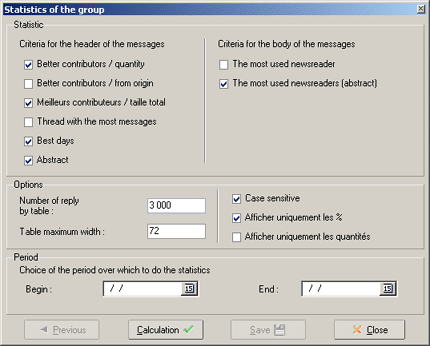
First part: criteria for headers of the messages.
- Better contributors/ quantity : gives as result the better contributors in a group, arranged according to the amount of messages send.
- Better contributors / from origin : identical, but they are arranged according to the amount of new conversations started by poster.
- Thread with the most messages : arranged by subject.
- Best days : shows the days with most messages posted.
- Abstract : summing up of the group (amount of messages, average amount of message poster etc.)
Second part: criteria for the body of the messages.
- The most used newsreaders : list of most used newsreaders in selected group. with also the different version numbers
- The most used newsreaders (abstract) : List of most used newsreaders in selected group but without different version numbers.
- Most used newsreaders ( in %) : list of used newsreaders but in %
Remark : statistics of body's only use fully downloaded messages.
Third part: options.
- Number of reply (table) : gives the maximum amount of lines that a statistic table can have.
- Table maximum width : gives the amount of characters that can be used for a table. With a value of 72 (default), the statistics can be published in a group and be seen by all readers.
- Case sensitive : when unticked there will not be consideration taken in differences of cases (capital letters of not) : the words "MesNews" and "mesnews" are evaluated as being the same. When ticked there consideration will be taken of the differences.
Fourth part: period.
- choice of period : fill in the beginning and end of the period you want to make the statistics. All messages found between those two dates will be used.
Once the options are selected push the button Calculation. The calculation can take a long time, depending on the amount of messages and the chosen options.
To save the statistics you have to push the button Save . Then you have to fill in the name of the folder where the statistics have to be saved.
(index)(menu)