


Menu search on the group
Menu groups/search on the group lets you search one or more messages in the selected group.
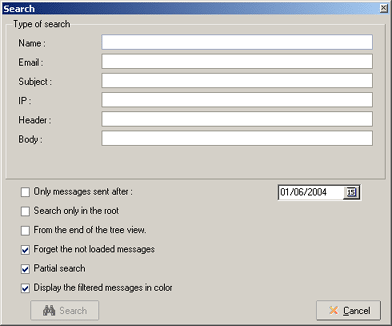
The top part of the screen lets you fill in certain criteria:
- Name : filter on name of poster
- Email : search on base of emailadres of poster
- Subject : search in the subjects of messages
- IP : search for IP's number of messages
- Headers : search in the headers of messages
- Body : search in body's of messages
The bottom part of the screen lets you select the way the messages are searched:
- Only messages sent after : when ticked there will only be a search in messages after the date put in.
- Search only in the root : tick this option to search only in the original postings (root) of conversations
- From end of the tree view : when unticked the search starts at the beginning of conversation and downwards. If ticked the search starts at bottom and goes upwards.
- Forget the not loaded messages : when ticked the messages you did not downloaded will be ignored. When the criteria for body's or headers is used they will be ignored to.
- Partial search : when ticked the search will happen on only part of fields. example, when you untick and you ask for messages with the subject "MesNews", all messages that have the word "MesNews" in the subject will be shown. Otherwise you will get the messages that have only the word "MesNews" in the subject.
- Display the filtered messages in color : when ticked the filtered messages will be shown in color in the tree of messages.
To start a search click the button search. From the moment there is a likeness in a message it will be shown. You can search further by using the button Next , you can also go back to previous message by using the button Previous. The button Ignore lets you ignore all messages of the now given conversation.
Remark :
- The IP addresses are not available on all servers.