


Preferences - screen
The screen of the menu Options/Preferences gives you the possibility to choose different windows positions for MesNews :
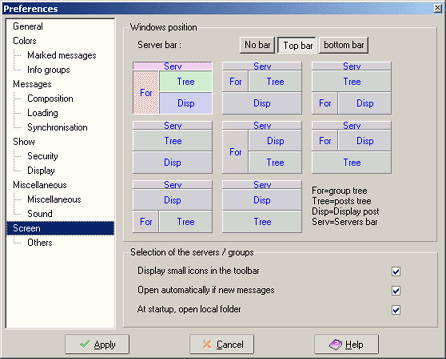
zone Windows positions :
The screen of MesNews has 4 different zones
:
-
The tree of messages (Arbre on the drawing on the screen), shows the list
of messages in the group. this list can hold the messages in a treeform, in function
of the position of the messages in the conversation. (thread)
- The zone of the message (Aff on drawings),
this shows the contend of a message (body of the message but also headers and
XFace)
-
The tree of groups (For on drawings), will show, ranked by server,
the different subscribed groups and also the local files. This zone can be hidden
if you use the serversbar.
- The serversbar(Serv on the drawings),
shows the list of server in the form of a toolbar, each button lets you access
all the subscribed groups on a server.
This field makes it possible to choose the zone shown and their positions. The 3 buttons on top of the screen are to choose if you want the serversbar to be shown and where on the screen it has to be situated. The you have according to your choice up to 9 possibilities to show the different zones.
zone Selection of the servers/groups :
- Display small icons in toolbar : when ticked, there will be small icons (16*16 pixels) on the toolbar (under menu, above screen) . Otherwise icons of the size (32*32) will be shown.
- Open automatically if new messages : when ticked, and news messages arrive in the group, the server will be opened so the name of the group with new messages can be shown. (remark : this option is only available if you show the grouptree)
- At startup open local folder : when ticked all the local files will be opened at startup of MesNews, Otherwise the position of the files are memorized and shown as where at last use of MesNews (remark : this option is only available if you show the grouptree)