


Options of display
Menu messages\Options of display makes it possible to choose messages in the groups and show these. The following screen lets you configure the display of messages:
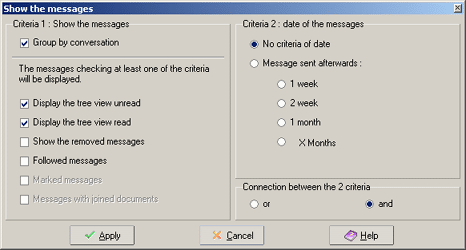
The screen has two zones: the first for the criteria of the messages to be shown, the second for the date of the messages to be shown.
Choice 1 : choice of criteria to show: You can make several choices: messages with at least one of the criteria will be shown.
- Group by conversation : when ticked the messages will appear by discussion (conversation) When not ticked the messages will be show all on same level as if it was a new discussion.
- Display the treeview unread :when ticked all the conversations with at least one unread message will be shown.
- Display treeview read : when ticked all the conversations from which all the messages are read will be shown. When this option and the option above is ticked: all conversations will be shown.
Remark : When these two options are ticked all other options of zone "choice 1" will be ignored ( the removed, followed up, marked messages are being read or unread so they will be included in one of the two options)
- Removed messages: when ticked all removed messages will be shown in message tree.
- Followed up messages : when ticked all discussions that include a followed up message will be shown. Marked messages : when ticked all marked messages will be shown. This option is not available when the box next to "group by discussion" is ticked.
- Message with attachment : when ticked the messages with one or more attachments will be shown. This option is only available when the box next toe "group by conversation" is not ticked.
Choice 2 : date of messages. You can only fill in one criteria about the date of the messages.
- No criteria of date : date is not checked. The messages to be shown only depend on the choice made in zone "choice 1"
- Message send after : Choice of period to show messages: this can be: 1 week, 2 weeks, 1 month, or other period in months. If the messages are grouped by discussion the criteria will be taken of the first message in the discussion.
Connection between two choices: If you filled in a date criteria then you also can put in a connection between two date criteria:
- or : messages who forfill at least one of the two criteria will be shown
- and : the messages have to forfill the two criteria to be shown.
Remark :
-When the box Group by discussion
is ticked the options in choice 1 will be used for the whole conversation. Otherwise
they will be used on each message individually.
-
To have all messages shown you only have to tick the boxes Display treeview
read
and Display treeview unread. According to the options group by discussion will
the messages be shown by discussion or not.